

You are applying to a job in another country
Set the target market, the photo and date-of-birth policy, and the resume language and the export language. They are independent settings and they do not live together.
On this page
A resume that works at home does not automatically work abroad, and the things that have to change are not only the words. The page size changes. Whether a photograph belongs on the document at all changes. Whether a date of birth is expected, tolerated or actively unwelcome changes. And the document can end up rendering in a different language from the one you were reading the app in when you exported it.
ATSReady handles all of that, through settings that live in more than one place and deliberately do not move together. This walkthrough takes them in the order you should set them and ends at the preview, the only place all four decisions are visible at once.
Four decisions, three places
Before you export anything, you are making these decisions:
- which market the document is aimed at;
- whether a photograph and the personal fields appear on it;
- which language the document itself is written and labelled in;
- which language the file you download comes out in.
The first three sit on the resume, in a sheet the product calls Market & language. The fourth sits on the export control in the preview toolbar, not on the resume at all. Nothing about the interface language you are reading this app in belongs on that list.
They are kept apart because they answer different questions and are answered at different moments. A market is a fact about where you are sending the document; it outlives any particular download. A document's own language is a property of that document. The export choice is a property of one file you are producing right now, and you may reasonably produce more than one from the same resume. Folding them into a single control would imply that changing any of them changes the others, and it does not — which is exactly the misunderstanding that produces a perfectly localized resume arriving in the wrong language. Language settings overview is the reference page that draws the same distinction from the other direction.
The target country
Open the resume, then open its market settings — the control is labelled Market & language settings and the sheet it opens is titled Market & language. The first field is Target market.
Setting it changes presentation, not content. It resolves the page size, the document conventions ATSReady applies, and the guidance you get about which personal details belong on the page. It does not rewrite a word of your text, and it does not translate anything. The sheet shows you what it resolved in a summary line naming the recommended format and page size, and the page sizes it names are A4 and US Letter. Target market settings for a resume carries the presentation rules in full.
Submission channel sits in the same sheet, and it is the field people skip. Its choices are ATS / online application, Email attachment, Printed copy, Government portal and Academic / research, and it is not a label — it changes what the document is allowed to contain. Set it to match how you are actually sending the file.
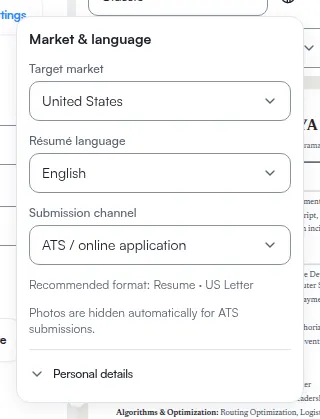
The sheet also warns rather than blocks. If the document's language is unusual for the market you picked, it says so — This language isn't typical for the selected market. — and leaves the choice with you, because a plausible reason to do it exists and the product does not know yours. If a resume was aimed at a market ATSReady no longer holds guidance for, it tells you it has substituted something and names what it substituted.
The photo and the personal fields
In the same sheet, Include photo sits above Personal details, whose hint reads Choose which personal details to show on this résumé. The fields it governs are Date of birth, Nationality, Visa status, Work authorization and Availability.
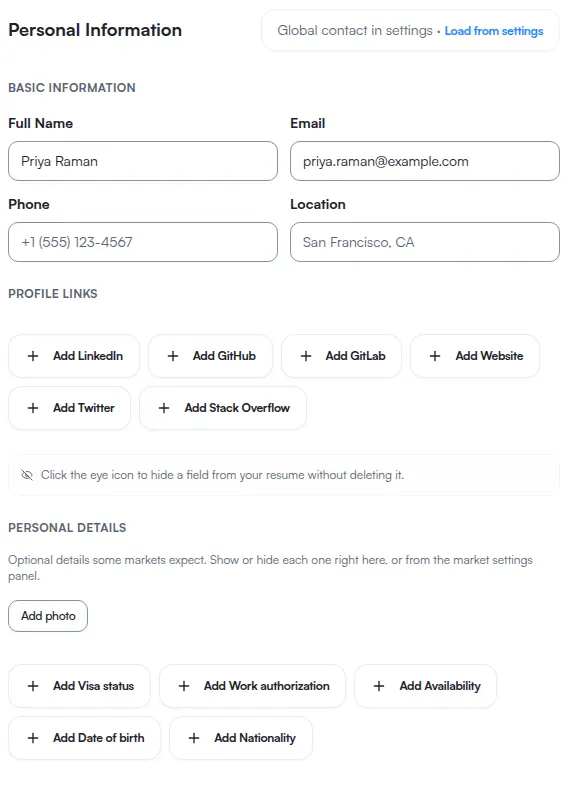
This is a policy question wearing the clothes of a preference, and the toggle does not have the last word. ATSReady will tell you plainly that Photos are hidden automatically for ATS submissions. — so a photo you switched on is removed when the channel says a machine reads the document first. Where a photo is legally or culturally risky it says Photos are discouraged for this market and may introduce bias risk. and applies the same reasoning to individual personal fields. Some fields are described as shown only when a posting or employer requires it.
The reason is worth stating, because it is the difference between a setting and a request. Anti-discrimination practice is not uniform, and a neutral convention where you live can be the thing that gets an application filtered out somewhere else. A toggle that simply obeyed you would quietly let you harm your own application. So the toggle is your request, and the resolved combination of market, channel and template is the answer. The template participates too: some layouts render no ordinary photo slot at all — see Resume templates. Resume photos and personal fields is the reference page for the whole resolution, and the size ceiling on a stored photo sits with the others in file limits.
The language the document renders in
The third field in that sheet is Résumé language, and it belongs to the document. It sets the labels ATSReady prints around your content — the section headings, the date formatting, the reading direction — and it stays with the resume when you come back to it next week.
It does not translate what you wrote. Changing it relabels the frame and leaves your sentences exactly as they were, which is why a resume can come out with correct headings above English bullet points. Your own text is translated by a separate workflow — Translate your content — and Résumé language explains how a resume's own setting is resolved when you have not set it explicitly.
That separation is deliberate. The labels are ATSReady's writing and it can safely rewrite them. The bullet points are yours, and rewriting them because you changed a dropdown would be editing your record without being asked.
The language you export in
Now the fourth decision, and the one that is somewhere else. Open the preview, open Export, and the dialog carries an Export language choice alongside the format.
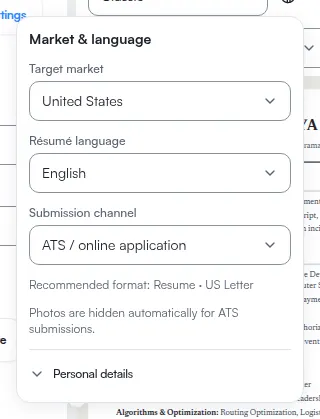
Here is the behaviour that surprises people, and it is the reason this walkthrough exists. If you never pick an export language explicitly, ATSReady resolves one for you: an explicit pick first, then your current interface language if the resume already has a translation in it, and the resume's own setting last. So a translated resume, opened by someone reading the app in that same language, can export in it without anyone having asked. Language settings overview is where that rule is published; this page's contribution is that you are most likely to meet it on exactly the night you are applying abroad, with translations you made weeks earlier for a different reason.
The fix is not to undo anything. It is to make the export choice explicit, every time, at the moment you download. Export a resume covers the formats and the rest of the export step.
What to check in the preview before you send it
The preview is the only place where all of it is visible at once, so read it as a checklist:
- the page size and layout match the market you set;
- the photograph is present or absent as the resolved policy intends, not merely as you toggled it;
- the personal fields showing are the ones you meant to show, and nothing else;
- the document's own labels are in the form you expect;
- the export selector says what you think it says, before you press the format.
If something is wrong, click the part of the preview that is wrong: on the desktop editor, clicking the rendered document selects the matching section in the form column, which is faster than hunting for it. Use the preview to jump to an edit explains where that shortcut works and where it does not.
Then export. If the file is not what you saw, the culprit is almost always one of two things: an unsaved edit that the export never read, or the export selector resolving to something you did not choose. Both are visible on the screen you were just looking at.
If your own text is still in the language you wrote it in, that is a separate workflow and a separate walkthrough: You switched the interface language and half your content is still English.