

Resume photos and personal fields
When ATSReady shows photo and personal-detail controls, which fields are supported, and which file rules apply to a resume photo.
ATSReady treats resume photos and personal details as presentation settings, not as fields that are always on.
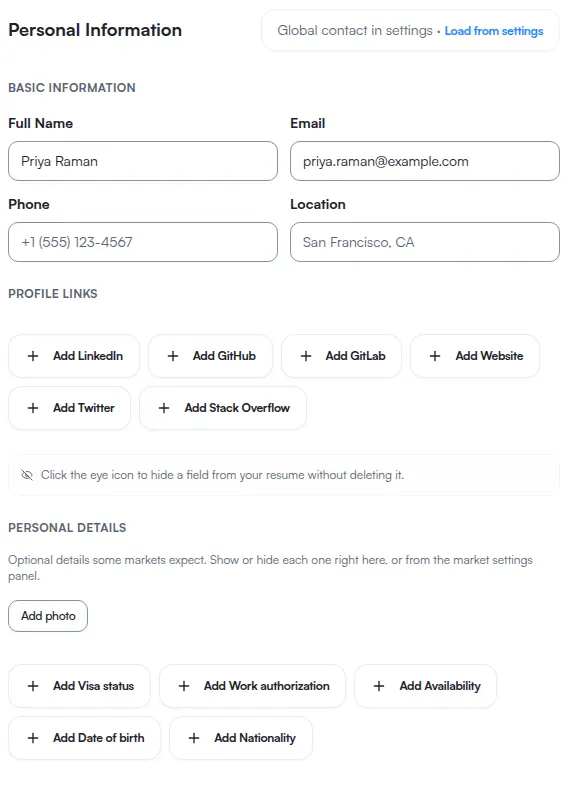
The photo field is part of the resume form, and the form only exists in the desktop workspace. Below 1024 px the resume route renders the document and the desktop notice, with no form and therefore no photo field — so adding or replacing a photo is a desktop task. See Resume editing on a phone.
Personal details ATSReady supports
The non-photo personal-detail fields are:
- date of birth,
- nationality,
- visa status,
- work authorization,
- availability.
Photo rules
- ATS submission hides the photo.
- Harvard renders a photo only when an employer explicitly requires it on a non-ATS channel. Which templates carry a photo slot at all is on Resume templates.
- Other templates follow the resolved presentation rules for the current market and channel.
Photo file rules
A resume photo is checked twice, and the two checks have different subjects.
The file you choose is checked first, before anything is uploaded: it has to be a JPEG, a PNG, or a WebP, and it has to be under 5 MB. Any other image type is refused at that point, whatever its size.
ATSReady then crops and re-encodes it, and the stored output is capped at 1 MB. That cap is on the re-encoded result rather than on the file you picked, which is why a large photograph usually still goes through: the crop is what brings it under the ceiling.
For the ceilings that apply to other uploads, see File limits.
Related
- Target market settings for a resume
- Resume templates
- Edit a resume
- You are applying to a job in another country, which takes the photo and personal-field decisions in order