

What Professional Identity is
Learn how ATSReady turns your resume, Professional Journey entries, and supporting notes into a generated professional profile.
On this page
Professional Identity is a generated professional profile based on the career evidence ATSReady already has about you. It helps you see how your experience, strengths, and skills read as a coherent professional story.
It is reached from the Identity row in the sidebar, and its first page is headed Overview.
What it summarizes
- your imported resume data
- your professional journey entries
- your notes and other evidence ATSReady can read across that record
What to look for on the page
- the main summary is labeled Elevator Pitch
- the AI Enhanced badge marks a summary that was really written by the model, rather than assembled from rules
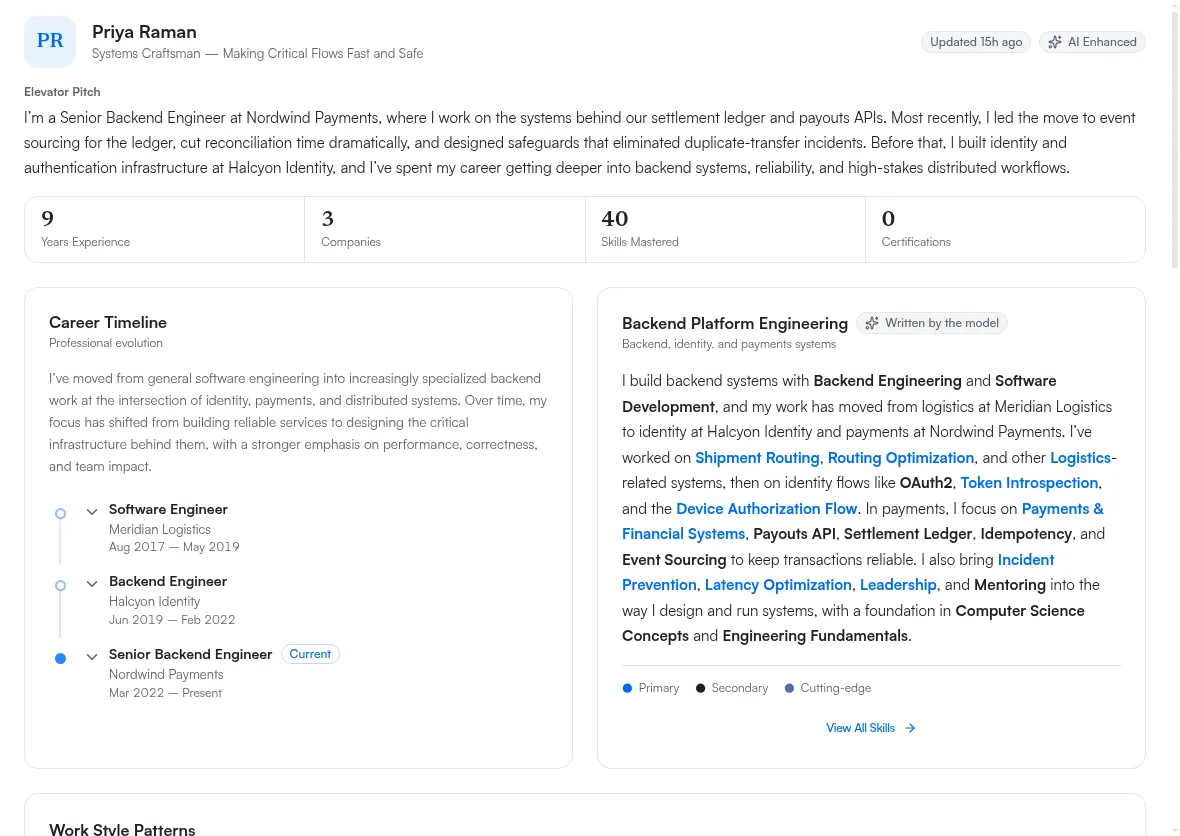
The badge is one of the first things a narrow window drops. Its row is drawn only once the identity pane itself is wide enough, so on a phone — and in a desktop window narrow enough that the pane is squeezed — the badge is absent whether or not the summary was model-written. Its absence at those widths says nothing about your profile.
Where skill highlights are explained
The Identity overview page also contains an AI-written technical-skills summary.
When that summary includes marked skill names, ATSReady shows a tier key for Primary, Secondary, and Cutting-edge directly on the overview card.
Use Professional Identity skills for the categorized skill inventory. Use Identity overview for the written summary and its tier legend.
What to change when it looks wrong
Do not start with the summary text itself. Start with the underlying record:
- fix the source in your professional journey
- confirm the missing evidence exists
- run identity regeneration