

Regenerate Professional Identity
Learn what ATSReady replaces during identity regeneration, what stays untouched, and how to recover when the result is still wrong.
On this page
Identity regeneration replaces the current AI-written identity output with a fresh run based on your current record. What it will not do is listed on Workflow boundaries.
What it replaces
- Elevator Pitch
- strengths
- work style
- growth areas
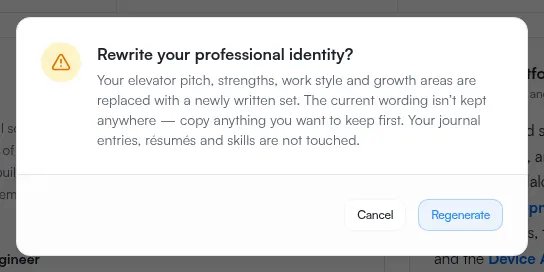
The current wording is not kept for comparison or restore. Copy anything you want to keep before you confirm.
The same run also re-reads your skills: it detects them again from your record and sorts the whole list into categories. Nothing you already have is deleted by that pass, but new skills can appear and an existing one can move to a different category.
What it does not touch
- your journey entries
- your resumes
How to use it
- Open Identity from the sidebar. The control is on Overview only — the Skills and Résumé sub-pages do not carry it.
- Select Regenerate Identity in the page header.
- Read the confirmation and accept it.
- Let the background job finish.
- Review the new identity output.
Regenerate Identity is one of the AI features a plan can gate. On an account without that access the button is still drawn, dimmed, with a short explanation of why pressing it does nothing — see Why something is locked.
What to expect while it runs
- ATSReady asks for confirmation before starting
- the work runs as a background job
- you can leave the page or reload and continue tracking it in Activity
- if it fails, your existing identity is left as it was
If the result is still wrong
- Correct the source record in your professional journey, by adding notes of the kind the missing part is about.
- Regenerate again after the source is accurate.
- If the job stops progressing, use When something is stuck.