

Import a resume
Accepted ATSReady resume import formats, where the import runs, and what to check if it does not finish.
On this page
ATSReady accepts resume imports in .pdf, .docx, .md, and .txt.
Before you start
Two different checks apply to the file you choose, and they run in different places.
Its type is checked by the import itself, and only those four extensions are accepted. The file picker in the wizard still offers .doc alongside them; a .doc file gets as far as the upload and is then refused, so convert it to .docx first.
Its size is checked in your browser, before the upload starts, against the per-type ceilings on File limits. The import endpoint validates the type rather than the size, so the browser check is the one that stops an oversized file.
How import works
- Start the import from the Get started wizard, described on First-time setup. That wizard is the entry point: the import route itself expects to be handed a file, and sends you back to the wizard if it is opened without one.
- ATSReady creates a processing job for the file and moves you to the import page.
- Watch the import page while it runs. It is the live surface, and it reports each phase as the job reports it.
- Review the imported resume and complete anything the parser could not infer. Dates are the field extraction most often drops — Your import finished and it says 0 years of experience follows that case from the figure on Professional Identity to the fix.
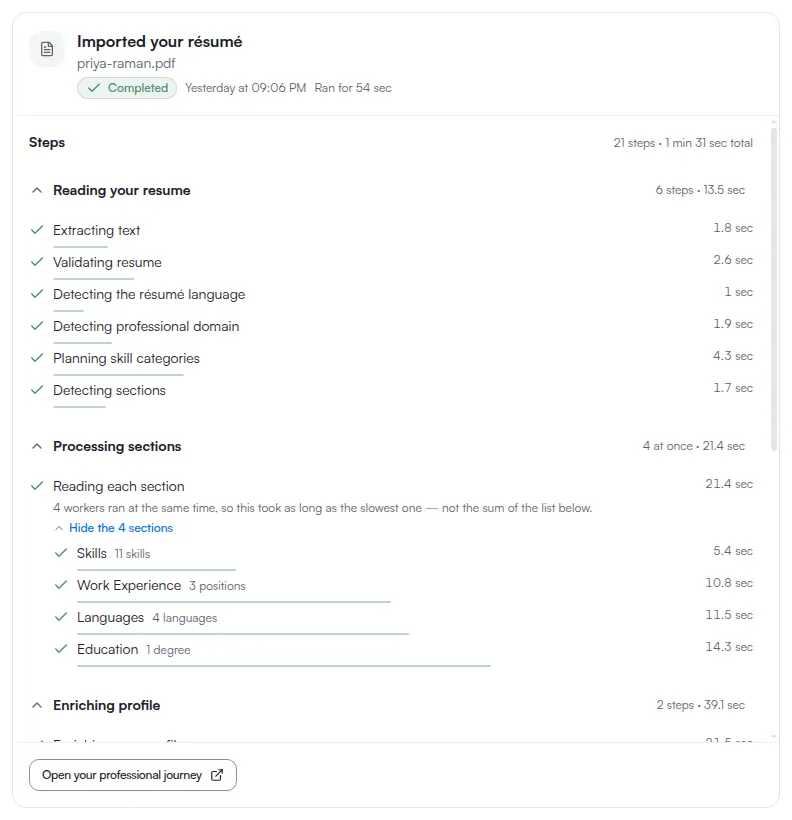
The same job also appears in the activity log, as a record rather than as the place you wait. Activity is worth opening when you closed the import page, or when you want to see what the job did after it finished.
What to expect after import
Import gets you into the editor faster, but it is not the last step. Check wording, hidden sections, market settings, and the export output.
Do not go looking for a section-order control: there is none. The order sections print in belongs to the template, so changing the template is how that changes. See What a resume includes.
If the import stalls or fails
- Check when something is stuck.
- Recheck file limits.
- If you still need the content in ATSReady, finish the record manually in your resume or Professional Journey.