

Target market settings for a resume
How ATSReady resolves resume country, language, submission channel, and presentation before export.
On this page
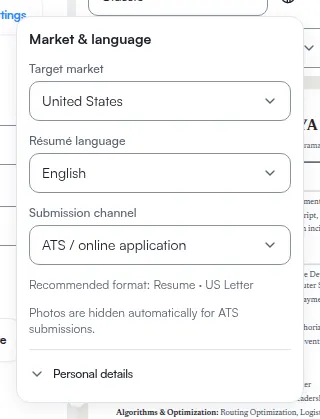
ATSReady resolves resume presentation from three controls that sit together in one panel, opened from Market & language settings in the toolbar above the preview.
What the settings control
The panel's three controls are labelled Target market, Résumé language, and Submission channel.
- Résumé language is what the document's own section labels are resolved from. It also sets the text direction and the formatting locale for dates and numbers.
- Target market is the country you are applying into. It sets the page size, decides which personal fields are expected or discouraged, and decides whether the document is called a resume or a CV. It can also override individual labels for that country, on top of the ones the language already resolved.
- Submission channel affects template suitability and photo visibility.
The summary line under the controls names the format ATSReady recommends from the combination, so you can read back what the three settings resolved to without exporting.
Where the controls are read-only
All three controls are disabled on any preview-only surface. There are three of them:
- the resume route below 1024 px — see Resume editing on a phone,
- a tailored resume that has been locked because its linked job moved off the first column of the board,
- and a resume opened from the Resume tab of a saved job.
You can see what the settings are on those surfaces and you cannot change them. To change them, open the resume in the desktop workspace at 1024 px or wider; if the resume is a locked tailored one, the lock has to be cleared first — see Tailored resumes.
What to change before export
Reopen the panel on an editable surface when any of these is wrong:
- the country you are applying into,
- the language the document should render in,
- or the channel the resume is meant for.
Those settings feed the same presentation logic that preview and export use.