

You found a job and want to know if it is worth it
Save the posting from the extension, then read the fit score, the reach reading, and the ATS and match percentages. They are four separate readings of four different things, and this page is where they are compared.
On this page
You are on a job posting in a browser tab and you want to know whether it is worth the hour it takes to apply properly. ATSReady gives you four readings on that question. They are produced at different moments, measured against different things, and none is a summary of the others — which is why a reader who treats them as one number ends up trusting whichever one they saw first. This page runs the path once, in the order it happens, then says which reading answers which question.
Most of this path needs a plan that reaches it, and so does the extension it starts in. What each plan includes says which plan reaches which reading; this page assumes yours does.
Save the posting first
The extension is the front of this path. On a page it recognises as a job posting it offers a save control, and saving submits the page to your account, where it becomes a job you can open, filter and score. Nothing further here works on a posting that exists only in a browser tab.
Two things are worth knowing before you rely on it. The extension stays quiet on pages it is not confident about rather than guessing, so a missing control is usually a judgement rather than a fault — Why the extension stayed quiet explains the detection order. And a save can end in several ways other than success, including a duplicate you already hold and a monthly allowance that is spent; When an extension save fails lists the outcomes, Monthly job import allowance owns the allowance, and Save a job with the extension covers the flow end to end.
A saved posting lands on the board as a row.
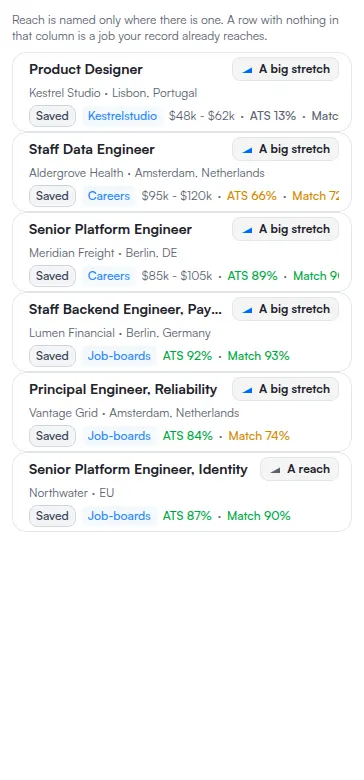
The rail is worth reading before any single job is opened, because the readings only become useful in comparison: one percentage on one posting tells you very little, and the same percentage against the postings underneath it tells you where to spend the hour. How the job board works covers the rail, the stages and the URL state behind them.
The fit score is about your preferences
The fit score is the extension's, and it is the only one of the four you see before the posting is saved. It compares the detected posting against the preferences saved in your account — the kind of work you said you want, on the terms you said you want it.
What it explicitly does not do is read your resume. It has no opinion about whether you would be a strong candidate. It has an opinion about whether the job is one you said you were looking for, which is a different and much earlier question: it is there to stop you reading postings you would have ruled out anyway.
That also explains the two ways it goes quiet. If the extension cannot evaluate the page it has nothing to score, and if your account holds no preferences it has nothing to score the page against. The signals it weighs and the bands it reports are on How the extension fit score works.
The reach reading is about distance
The reach reading is the one people most often mistake for something else, and the mistake is usually geography. It is not about how far the office is. The distance it measures is between the job and the record you already have: how far above, at, or below your evidenced level this particular posting sits.
It is measured against your Professional Identity — your journey, your skills and your education — not against a document you tailored for the occasion. That is what makes it honest: a resume can be rewritten in an afternoon, and the record behind it cannot. It is also why the reading arrives with a note about what would close the gap rather than only a verdict. The gap is the useful part.
Two consequences follow, and both surprise people. A posting with nothing in the reach column is not one that failed to be read: it is a posting your record already reaches, and the absence is the answer. And a job below your level is flagged just as a stretch is, because being overqualified is also information about whether the hour is worth spending.
Geography is a separate control entirely. The board's radius filter, its country filter and distance sort are described on Filter jobs and use distance search, and none of them feeds the reach reading.
The percentages on the job itself
The last two readings live on the job rather than in the extension, and appear once a resume is linked to the posting. Open the job from the rail and move to its Analysis section.
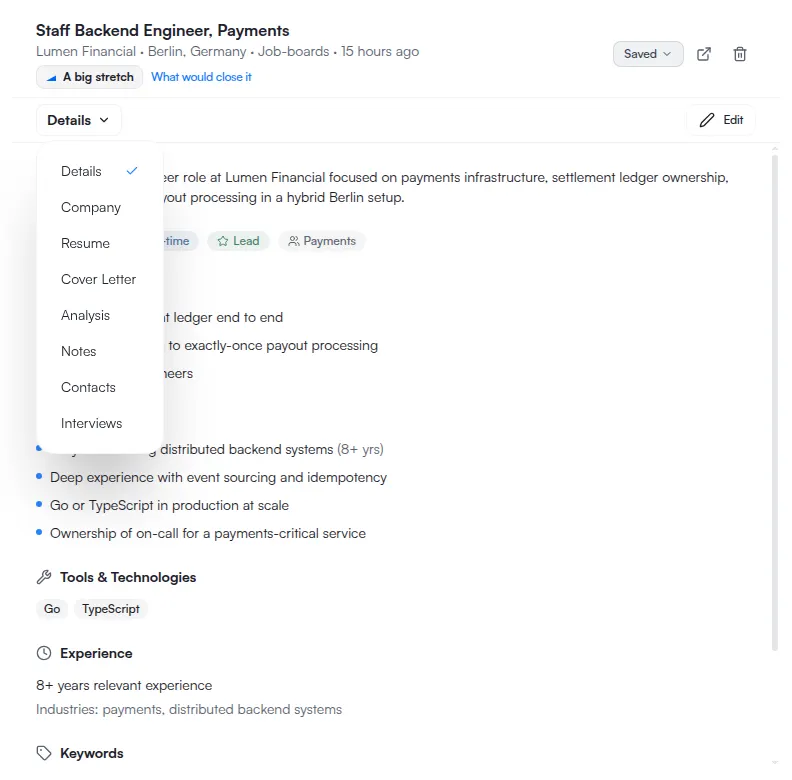
There are no tabs in the detail pane. The eight sections — Details, Company, Resume, Cover Letter, Analysis, Notes, Contacts and Interviews — are reached through a menu in the pane header, and the menu's label is the section you are currently in. That is why it reads Details on arrival and looks like a heading rather than a control. Job details sections lists what each holds.
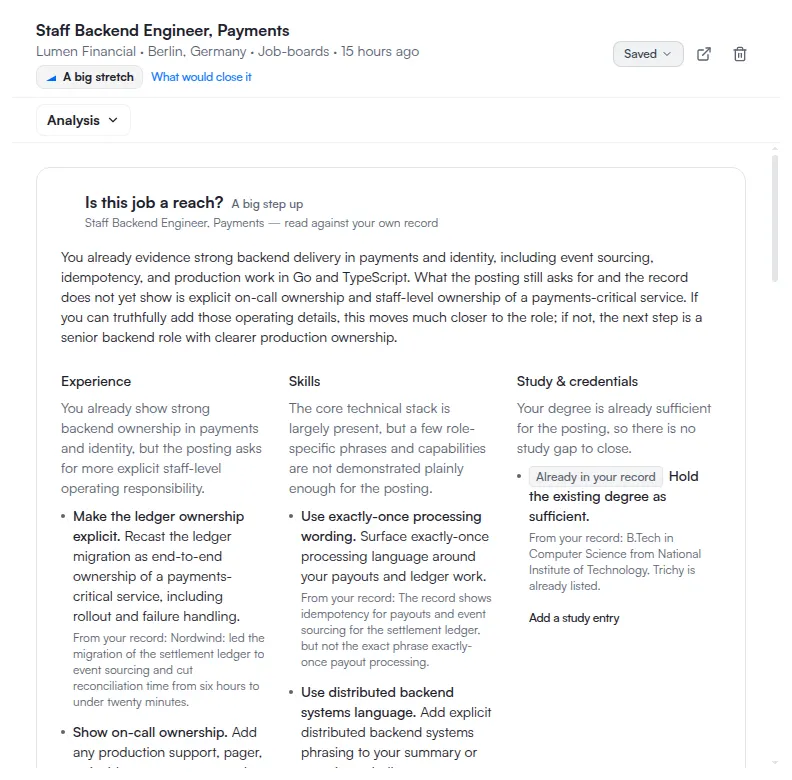
Two percentages are reported here and on the row itself: the ATS reading and the Match reading. They are separate measurements and can disagree on the same posting without either being wrong. Both belong to a resume linked to this job, which explains most of their behaviour — including why a job you have only just saved carries neither. How ATSReady scores jobs and resumes is the canonical page for what the readings are and how their bands are drawn; this walkthrough does not repeat those bands, because a threshold copied onto a second page eventually goes wrong on one of them.
Which reading answers which question
| Reading | Measured against | The question it answers |
|---|---|---|
| Fit score | The preferences saved in your account | Is this the kind of job I said I wanted? |
| Reach | Your Professional Identity — journey, skills, education | Is this above, at, or below what my record already evidences? |
| ATS reading | A resume linked to this job | How does this document hold up as a submission for this posting? |
| Match reading | A resume linked to this job | How closely does this document line up with what the posting asks for? |
Read down the column of questions rather than across the row of numbers. A posting can score well on preferences and badly on reach, which means you want it and are not yet evidenced for it — a reason to apply with a stronger document, not a reason to skip. It can also read well on reach and poorly on the linked resume, which puts the gap in the document rather than in you.
The Company section is the fifth input and the one no percentage covers: what the organisation is like to work for. If the answer is that you want to apply, You need a cover letter tonight picks the path up from there, and You have an interview on Thursday is what to read once they reply.
If no score appears
Work through the readings in the order they are produced, because an absence at one stage explains the absences after it.
A missing fit score means the extension had nothing to compare: it could not evaluate the page, or your account holds no saved preferences. A missing reach reading usually means there is no Professional Identity yet to measure the job against, which is the ordinary state of an account that has just saved its first posting. Missing ATS and Match readings mean no resume is linked to this job yet.
A reading your plan does not reach is absent for that reason and for no other, and nothing you add to the account will fill it. Why something is locked is how to tell that apart from a missing input.
None of the four is retried by reloading. Each becomes available when the thing it measures against exists.