

Filter jobs and use distance search
How the ATSReady jobs workspace combines search, stage, reach, work-type, country, and distance filters.
Use search, Filters, and sort together on /jobs.
What lives in Filters
The Filters popover combines:
- stage filters, under Stage,
- the reach filter (Only jobs above my level) — which needs a plan that includes the reach reading,
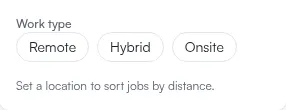
- Work type, as three buttons reading Remote, Hybrid and Onsite,
- Country,
- and, once ATSReady has a location to measure from, Radius and a Sort choice of Most recent or Nearest.
One badge on the Filters button counts all active filters together.
Distance rules
- Radius presets are 10 km, 25 km, 50 km, and 100 km.
- The Radius and Sort controls appear only when an origin exists. Without one, that part of the popover is replaced by a single line reading Set a location to sort jobs by distance.
- The origin can come from explicit
latandlngquery values or from a saved profile location that the server resolves. That location is the Location section of Preferences.
The browser only sends precise coordinates when the URL already contains them.
If distance sort is unavailable
Set a saved location in preferences or remove distance-only filtering and use the other filters first.