

Company research
What the Company section of a job contains, how ATSReady gates access, and what the panel shows while research is missing, loading, or stale.
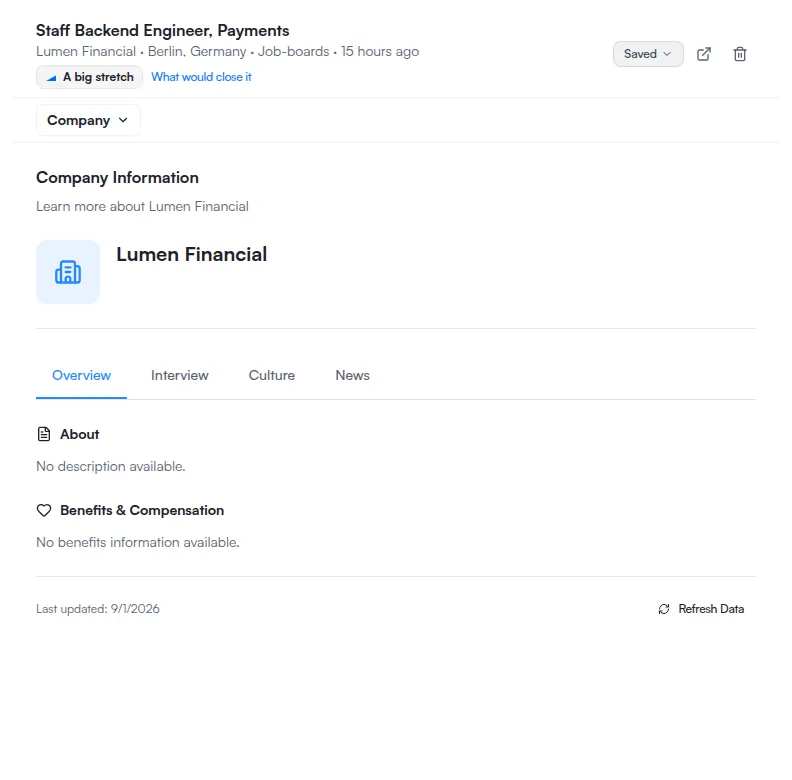
Company research lives in the Company section of job detail, reached from the section menu in the pane header.
The four company tabs
Inside the section, the research itself is split across four tabs:
- Overview
- Interview
- Culture
- News
These are the one place in the job detail pane where the word tab is literal: they are a real tab strip, and the panel below is the tab's own panel.
What the panel can show
The panel renders one of these instead of the research, depending on what it has:
- a loading skeleton, shown both while the research is being fetched and before your access has been checked — the two are one state on screen, not two,
- the access gate, when your plan does not include company research,
- a network failure,
- research that has been requested but has not arrived yet,
- research that failed,
- or the research itself, flagged when the stored copy has gone stale.
If you do not see research
The panel checks access before rendering the research experience. If your plan does not include company research, ATSReady shows the access gate instead of partial data — What each plan includes is the canonical tier table, and running the research also spends a slot from your monthly job import allowance.
If you see the skeleton and nothing follows, that is the loading or access-check state rather than an error; the panel resolves to one of the outcomes above on its own.
Related
- Job details sections
- Plans
- The free trial
- What ATSReady chat can do
- You have an interview on Thursday, where research is the other half of the preparation