

How job and resume scores work
Where ATSReady shows ATS and match scores in the jobs workspace and how those scores differ from the extension fit score.
On this page
ATSReady surfaces stored ATS and match scores on job rows and in job detail. They are not the same reading as the extension fit score.
Both readings need a plan that includes them — What each plan includes says which.
What the jobs list shows
Each row on the job rail can carry two readings, shown as a percentage on a labelled chip:
- one labelled ATS,
- one labelled Match,
- or both.
A row shows only the readings that exist. If a job has multiple linked resumes, the row shows the highest available ATS score and the highest available match score. Tailored resumes explains how a resume gets linked to a job in the first place.
Score bands used for color
The job-row score color helper uses three bands:
- 80 and above,
- 60 to 79,
- below 60.
Where the same scores are explained
The Analysis section of the job detail pane is where those numbers are broken down rather than just displayed. It opens with a reading of how far the job sits from your own record, and carries ATS Score, Job Match, and Top Recommendations below it.
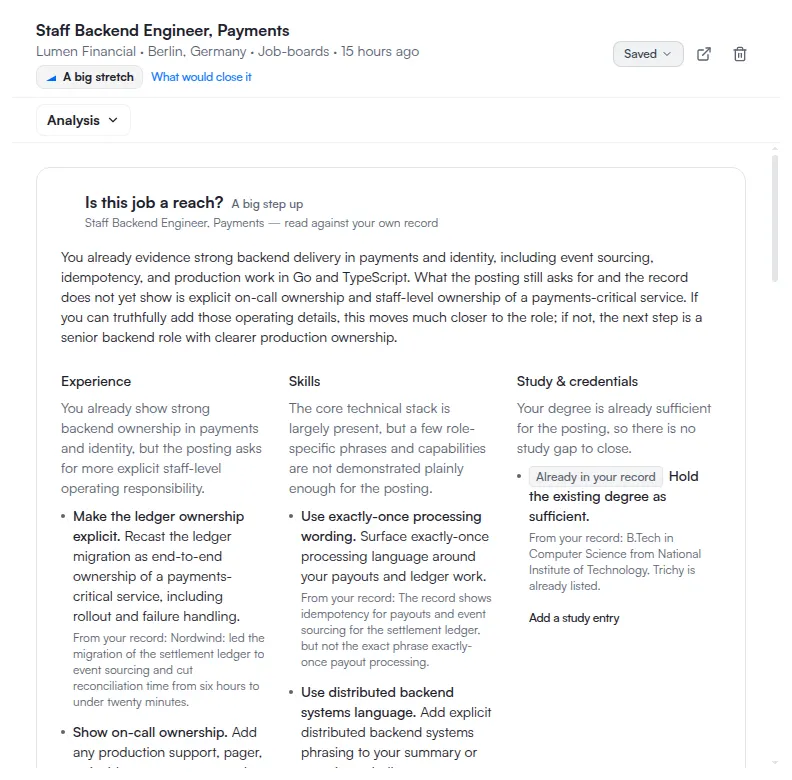
Open it from the section menu in the detail pane header. See job details sections.
What this page does not cover
The Chrome extension’s fit score is a separate preference-based heuristic. It is not the same as the ATS or match scores stored on job-linked resumes, and the two are not comparable numbers.