

Workflow boundaries
Important limits and non-actions in ATSReady identity regeneration, content translation, activity states, and résumé push.
This page lists important workflow limits that are easy to misunderstand.
Identity regeneration
- regeneration does not preserve the previous wording for restore or compare
- regeneration does not rewrite your journey entries or résumés
Regenerate Professional Identity is the task page for the run itself.
Content translation
- translation does not overwrite the original text
- translations in retired languages are kept, but they do not appear in the current panel unless that language returns
Translate your content owns the panel and its row states.
Activity
- Stuck is not a separate server state
- a stalled résumé import that later fails is reported as a retry case, not as successful output
Status words gives the exact meaning of each state, and What to do when a background task is stuck covers the stalled résumé import case.
Journey push
- push does not write to a résumé that changed after the preview was built
- push does not write to a tailored résumé that is currently locked
- push does not use AI for the whole job: the Facts half is copied from records you wrote, and only the Bullets half is written by the AI service
- tailored résumés grouped under Tailored — job still in the first board stage are offered as targets and carry an Optional badge, but they are not preselected
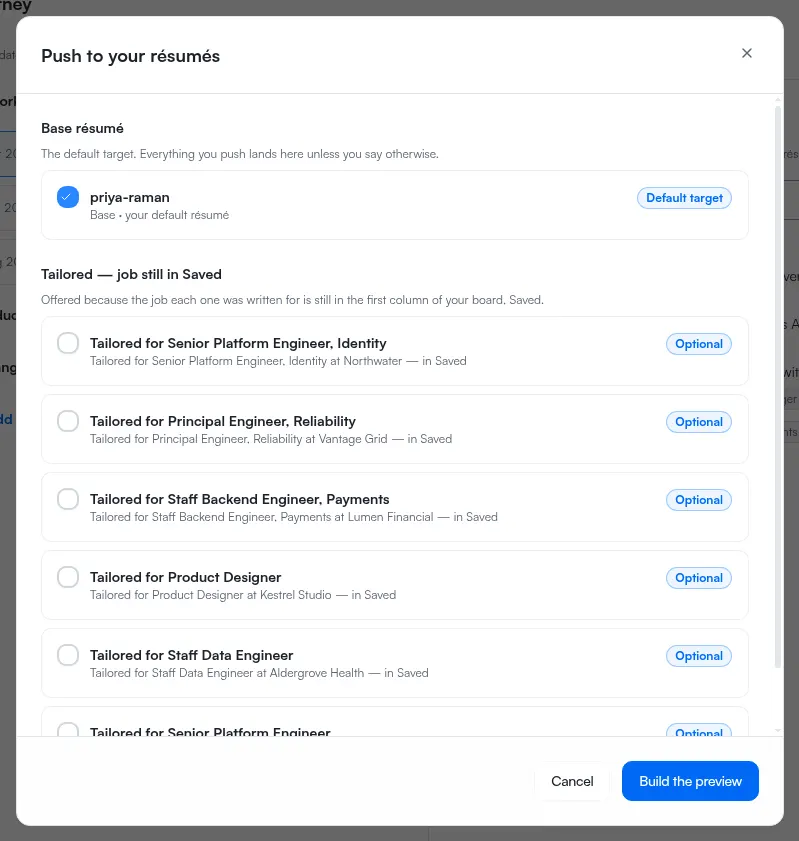
Tailored résumés grouped under Tailored — locked are the second case. Each one names the board stage its job moved to and states that it unlocks when that job returns to the first column of your board. Tailored resumes explains the lock, and How the job board works explains which column counts as first.
For broader “is this feature present?” questions, use the task page for that workflow first.