

Professional Identity skills
Understand the AI Skill Insights panel, the categorized skill list, and where ATSReady explains highlighted skill tiers.
On this page
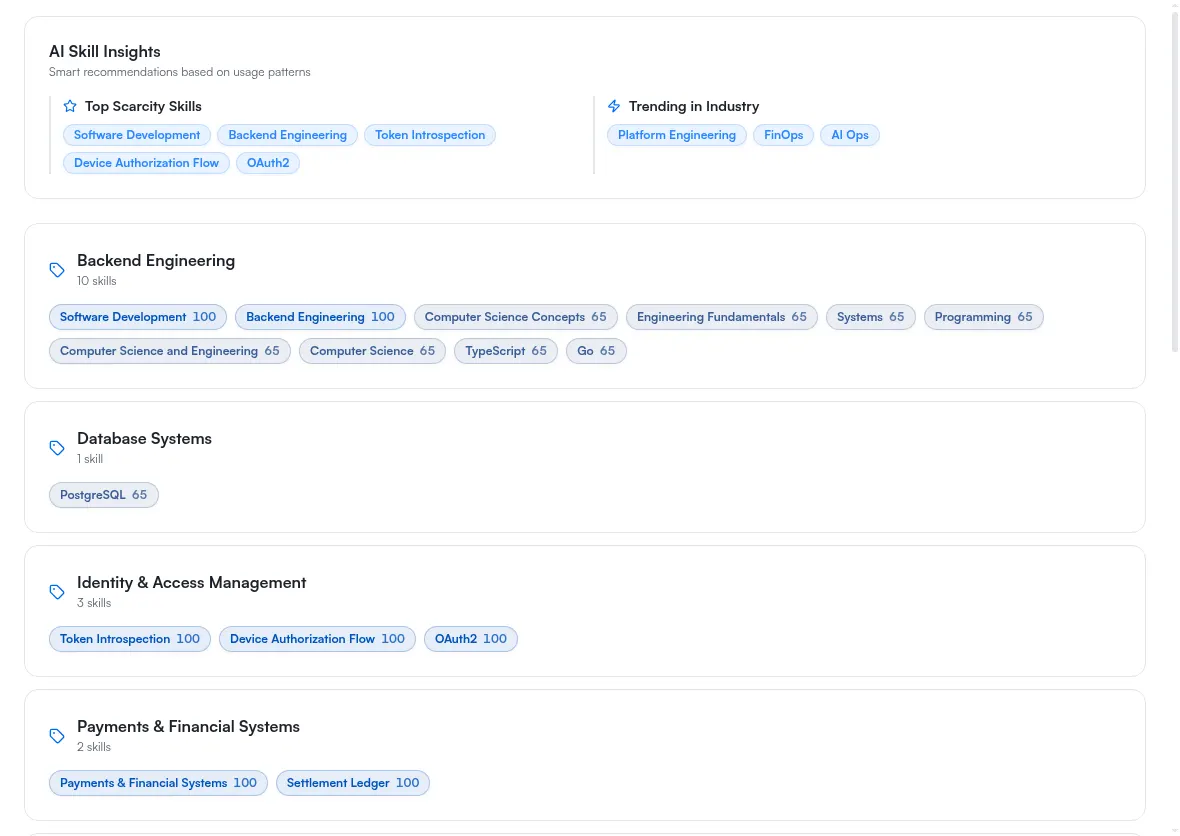
The Skills page shows your skill categories plus a separate AI insights panel. It is the Skills sub-row under Identity in the sidebar.
What this page shows
- an AI Skill Insights panel with Top Scarcity Skills and Trending in Industry
- skill chips grouped into named categories
- an Other Skills group when ATSReady still has uncategorized items
If you have no skills yet, this page can show a loading state first and an empty state if nothing is available.
What the two insight lists actually are
Top Scarcity Skills is the handful of skills your own notes mention most, ranked by that count. Despite the name it is a ranking inside your own record, not a comparison against a job market, so a skill leads that list because you write about it often.
Trending in Industry is a fixed list ATSReady ships. It is the same for every account and does not respond to your record, so a skill missing from it says nothing about you.
What the tier legend applies to instead
The Primary, Secondary, and Cutting-edge labels belong to the AI-written skills summary on Identity overview, not to the categorized Skills page.
Use this page to review categories. Use Identity overview to read the written summary and its tier key.
What to do when skills look wrong
- Fix the source record in your professional journey notes.
- If many skills are still under Other Skills, use Organize into categories. That control is drawn under the Other Skills group and nowhere else, so it disappears once there is nothing left to sort — and it is one of the AI features a plan can gate, so see Why something is locked if it is dimmed.
- If the broader identity output is wrong, run identity regeneration from Identity overview. That is also the way to rebuild the skill profile itself; this page has no rebuild control of its own.
When this page is sparse or empty
If ATSReady still cannot produce enough identity content, use Why a Professional Identity section is missing.