

Manage your account details
Update your ATSReady display name and avatar, understand why the email field is read-only, and find subscription, entitlement, usage, and billing details on the Account page.
On this page
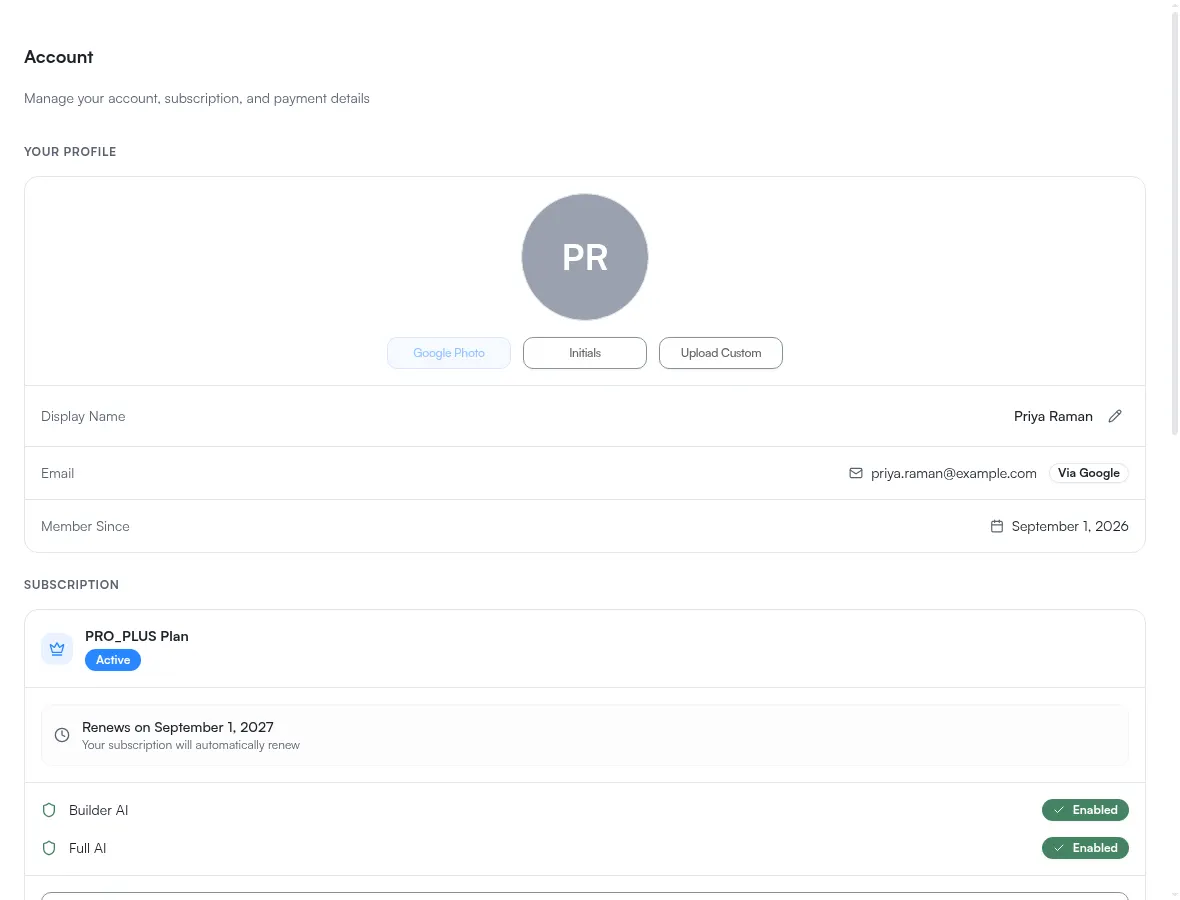
Use the Account page to manage your display name, avatar, subscription, payment method, and billing history.
What you can change
- your display name
- your avatar source: Google Photo, Initials, or Upload Custom
What stays read-only
Your email address is shown with the label Via Google and is not editable on this page, because ATSReady issues no product password of its own — see Sign in.
File limit to know
A custom avatar must be an image, and it is rejected above the account avatar ceiling. That ceiling is on File types and size limits with the rest of them.
What else is on the page
In order below your profile:
- Subscription — your current plan with its status badge, the renewal or cancellation date, and two entitlement rows, Builder AI and Full AI, each marked Enabled or Locked; What each plan includes is the canonical table behind them
- Usage — your monthly job allowance and its reset date, shown only when your plan includes one
- Payment Method — the card on file, or an invitation to add one
- Billing History — past payments, or a note that there are none yet
- Danger Zone — Cancel Subscription when you have one to cancel, and Delete All Data; read Reset or delete your data before you use it
- Need Help? — a Contact Support link for account and billing questions
Member Since appears in the profile block once your account has a recorded creation date.
Why some of these are missing
Several blocks are conditional, so a page with fewer of them is not a broken page. The usage card needs a plan that includes an allowance. Cancel Subscription needs a subscription that is not already ending. Upgrade and Manage Subscription are never both there — and during a trial neither is, because there is no purchase to manage and nothing to upgrade from. A subscription block with no button in it is the correct state for a trial, not a block that failed to load.
A quirk worth knowing during a trial
While you are trialing, this page reads from two different places at once. The plan name and the entitlement rows reflect the tier you are trialing, and the status badge reads Trial. The buttons read from the plan you actually own, which is still Free — and you own nothing yet, so there is no Cancel Subscription to click and nothing to manage. Nothing is wrong; the trial is access, not ownership, and the rows are what confirm it. Check the entitlement rows rather than the buttons. The free trial explains the distinction.