

How the extension fit score works
The six preference signals, their weights, how an unstated signal is handled, the hard-fail cap, and why a posting sometimes gets no score.
On this page
The extension fit score compares a detected job posting against the preferences saved in your ATSReady account. It does not score the job against your resume — the readings that do are on How job and resume scores work.
Most of this path needs a plan that reaches it. What each plan includes says which plan reaches which reading; this page assumes yours does.
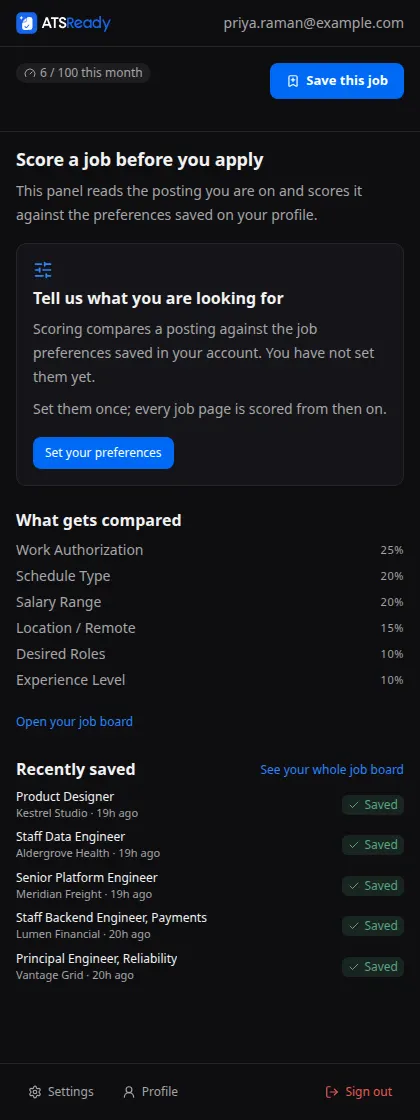
The six weighted signals
| Signal | Weight |
|---|---|
| Work Authorization | 25 |
| Schedule Type | 20 |
| Salary Range | 20 |
| Location / Remote | 15 |
| Desired Roles | 10 |
| Experience Level | 10 |
Each signal is shown in the panel's Signals list with its weight and one of four states: Pass, Warning, Fail, or Not stated.
What happens when a posting does not state a signal
A signal the posting never mentions is left out of the score entirely. It is not counted as a miss and it is not counted as half a miss.
The score is calculated only over the signals the posting actually stated: each stated signal's result is multiplied by its weight, the total is divided by the weight of the stated signals alone, and the result is expressed out of 100. So the number answers "of what this posting told us, how much matches" — a vague advert does not drag the score down on your behalf.
If the posting states none of the six, there is no score at all. See the unscored reasons below.
Hard-fail cap
If Work Authorization or Schedule Type hard-fails, the overall score is held at 30 however well the rest scored.
When that happens the panel does not quietly show the lower number. It adds a chip that names both figures — the score it was held at, and the raw score it would otherwise have had — and it marks the signal responsible with a Hard fail pill in the signals list. If the two numbers on that chip are far apart, the cap is the whole story and the rest of the posting matched well.
Score bands in the side panel
- 70 and above: Strong fit
- 40 to 69: Mixed fit
- below 40: Weak fit
When there is no score
The panel headed Score a job before you apply replaces the score card whenever there is nothing to score. It names which of seven reasons applies:
| The panel reads | What it means |
|---|---|
| Nothing scored yet | The panel is open but has not scored anything yet |
| Tell us what you are looking for | No job preferences are saved on your profile |
| No page to look at | There is no web page in this window to inspect |
| This does not look like a job posting | There is a page and it was not detected as a posting |
| This page could not be read | The page could not be inspected |
| The panel lost its connection | The panel could not reach the extension's background worker |
| This posting does not say enough to score | The posting states none of the things your preferences cover |
The last one is the most common. It is a fact about the advert rather than about you, and the panel says so rather than showing a zero.
Related
- Preferences
- How ATSReady scores jobs and resumes
- Why the extension stayed quiet
- You found a job and want to know if it is worth it, which compares this reading with the other three