

Professional Journey
Learn how Professional Journey organizes career evidence that ATSReady reuses in Professional Identity and resume workflows.
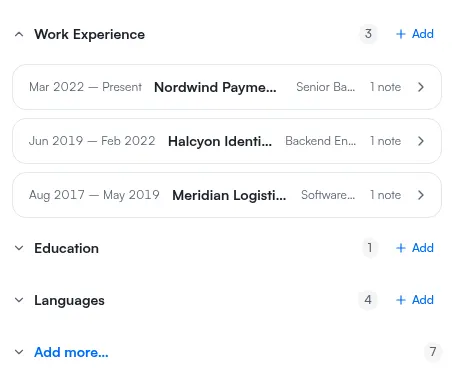
Professional Journey is your structured career record in ATSReady. It organizes experience, education, projects, achievements, and other evidence into structured entries with supporting notes. Most of those entries carry dates; Languages and Interests carry no date field at all.
In the app it is the Journey row under Identity in the sidebar, and the page it opens is headed Journey.
Professional Journey is the source record; Professional Identity is the generated summary of that record. ATSReady can also reuse Journey content in resume workflows.
Start here
- Professional Journey categories
- Add notes to a Professional Journey entry
- Why a Professional Journey entry needs dates
- Push Professional Journey content to a resume
Use Journey when you need to add evidence, fix chronology, or push note-backed content into a resume.
You did something at work and want it on record runs that path once, from the thing you did to a line on a document.
Pages in this section
- 01Professional Journey categoriesReference list of the ten current categories ATSReady uses in the professional journey source record.
- 02Add notes to a Professional Journey entryLearn how ATSReady journey notes are attached, saved, and reused by identity and resume workflows.
- 03Why a Professional Journey entry needs datesUnderstand the ATSReady Needs dates group, the month-year date format behind it, and how to fix an undated journey entry.
- 04Push Professional Journey content to a resumeUnderstand what an ATSReady push writes to a resume, which resumes it can target, and what each per-resume result means.
Nothing in this section matches